Staring at a blank page is the worst part of any job application. If you want to write a cover letter with AI, you can skip that page entirely. But there is a catch. A lazy prompt produces a lazy letter, and recruiters spot generic text within seconds.
This guide shows you how to write a cover letter with AI the right way. You will get a simple five-step process, copy-and-paste prompts, a before-and-after example, and tips for US and UK applications. By the end, you will have a letter that sounds like you, not like a robot.
Can You Use AI to Write a Cover Letter?
Yes, you can. Many job seekers already do. AI is good at structure, grammar, and speed. It can turn your rough notes into a clean draft in under a minute.
However, AI is not good at knowing you. It does not know your real achievements, your reasons for wanting the role, or your personality. That means the best approach is a partnership. You supply the facts and the voice. The AI supplies the structure and polish.
Think of it as a very fast writing assistant. It drafts, and you decide. If you hand over the whole job, the result will feel flat. If you guide it well, the result can be excellent.
What AI Does Well (and What It Does Badly)
Before you start, it helps to know where AI shines and where it struggles.
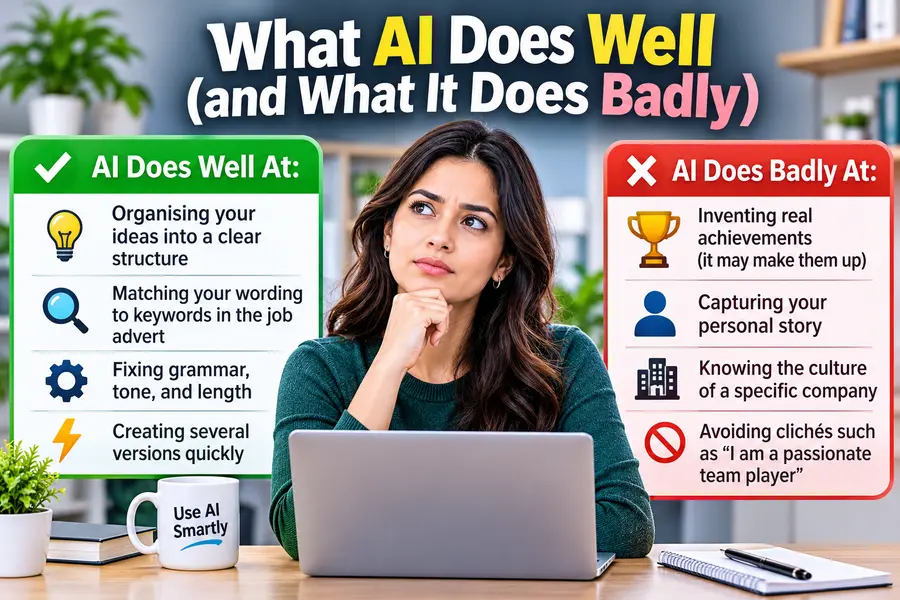
AI does well at:
- Organising your ideas into a clear structure
- Matching your wording to keywords in the job advert
- Fixing grammar, tone, and length
- Creating several versions quickly
AI does badly at:
- Inventing real achievements (it may make them up)
- Capturing your personal story
- Knowing the culture of a specific company
- Avoiding clichés such as “I am a passionate team player”
Keep this list in mind. Every step below is designed to cover the weak spots.
Step 1: Gather Your Raw Material First
Good output starts with good input. Before you open any AI chat, collect four things:
- The job description. Copy the full text, not just the title.
- Your CV or resume. Have your latest version ready.
- Three to five achievements. Use numbers where you can. For example, “cut onboarding time by 30%” is far stronger than “improved onboarding.”
- One reason you want this job. Be specific. Maybe you admire the company’s product, or the role fits your next career step.
This preparation takes ten minutes. However, it makes the difference between a generic letter and a convincing one.
Step 2: Use a Master Prompt to Write a Cover Letter with AI
A strong prompt gives the AI a role, context, a task, and rules. Here is a master prompt you can copy and adapt:
Several parts of this prompt matter. The line “do not invent anything” reduces made-up claims. The word limit keeps the letter tight. The instruction about the opening line avoids the dull, overused starter that every recruiter has read a thousand times.
Act as an experienced career coach and professional writer. Write a cover letter for the job below. Use my CV and achievements as the only source of facts. Do not invent anything. Keep it under 300 words, in a warm and confident tone, with short paragraphs. Open with a specific hook, not “I am writing to apply.” End with a clear call to action.
Job description: [paste here] My CV: [paste here] Key achievements: [paste here] Why I want this role: [paste here]
Several parts of this prompt matter. The line “do not invent anything” reduces made-up claims. The word limit keeps the letter tight. The instruction about the opening line avoids the dull, overused starter that every recruiter has read a thousand times.
Finally, always run the prompt more than once. Ask for two or three versions, then pick the strongest parts of each.
Step 3: Tailor the Letter to the Job Description
A tailored letter beats a polished one. Once you have a draft, use a second prompt to sharpen the match:
Compare my cover letter with the job description. List the five most important requirements in the advert. Then tell me which ones my letter covers well and which ones are missing. Suggest edits, but keep my voice.
This check helps you pass applicant tracking systems, which scan for keywords. It also shows the hiring manager that you read the advert carefully.
Next, add one detail that only you could know. For example, mention a recent product launch, a company value that resonates with you, or a project you followed. AI cannot guess these details, so they make your letter feel real.
Step 4: Edit It So It Sounds Human
This step matters most. Raw AI text often has a recognisable style: long sentences, big words, and phrases such as “I am excited to leverage my skills.” Fix this in three ways.
- Read it aloud. If a sentence feels awkward to say, rewrite it. Your letter should sound like a confident version of how you speak.
- Cut the clichés. Delete phrases like “team player,” “hard-working,” and “passionate about.” Replace them with proof. Instead of “I am a strong communicator,” write “I ran weekly client calls for 40 accounts.”
- Add rhythm. Mix short and long sentences. You can even ask the AI to help:
Rewrite this letter so it sounds more natural and conversational. Use simple words, vary the sentence length, and remove corporate buzzwords. Keep all facts unchanged.
After that, make a final manual pass. Check every date, number, and company name. AI sometimes changes details without warning, so you must verify each fact yourself.
Step 5: Proofread and Format
Finally, polish the letter. Keep it to one page, which means roughly 250 to 350 words. Use a clean font, standard margins, and three or four short paragraphs.
A reliable structure looks like this:
- Opening: A hook that names the role and shows genuine interest
- Middle: Two achievements that match the job’s main needs
- Closing: A confident call to action, such as asking for an interview
Then proofread twice. Use a spell checker, and ask a friend to read it as well.
Cover Letter Prompts for Specific Situations
Not every applicant has the same background. These prompts help you write a cover letter with AI in common tricky situations.
Career Change Cover Letter
I am moving from [old field] to [new field]. Write a cover letter that highlights transferable skills such as [skills]. Address the career change directly in the second paragraph and explain why it makes me a stronger candidate. Do not apologise for the change.
No Experience or Entry-Level Cover Letter
I am applying for my first role in [field]. I have no formal experience, but I have [projects, volunteering, coursework]. Write a cover letter that focuses on these experiences, my willingness to learn, and my enthusiasm for the company. Keep it under 250 words.
Graduate Scheme Cover Letter (UK)
Write a cover letter for a UK graduate scheme at [company]. I studied [degree] at [university]. Use British spelling, highlight two examples that show teamwork and problem-solving, and explain why I want to join this company specifically.
Follow-Up After an Application
Write a short, polite follow-up email for a job I applied for [number] days ago. Mention the role, restate my interest in two sentences, and ask about the next steps.
Before and After: A Real Example
Seeing the difference helps. Here is a weak AI draft produced from a vague prompt:
“I am writing to apply for the Marketing Coordinator role. I am a passionate and hard-working team player with excellent communication skills. I am excited to leverage my skills to contribute to your company.”
This opening could belong to any applicant. Now look at the improved version, written with the master prompt and a few manual edits:
“When your spring campaign doubled newsletter sign-ups, I noticed the subject lines first. At Brightside Media, I wrote similar copy that lifted our open rate from 18% to 31% in six months. I would love to bring that same focus on testing and clear writing to your Marketing Coordinator role.”
The second version is specific, measurable, and personal. It shows research, and it proves results. That is the gap you close when you write a cover letter with AI using good prompts and careful editing.
US vs UK Cover Letters: Key Differences
If you apply across both markets, remember a few differences. Tell the AI which version you need.
- Terminology: Americans say “resume,” while the British say “CV.” Both use “cover letter” or “covering letter.”
- Spelling: Use American spelling (organize, color) for US roles and British spelling (organise, colour) for UK roles.
- Tone: US letters are often more direct and achievement-focused. UK letters tend to be slightly more measured, though still confident.
- Personal details: Never include your age, photo, or marital status in either country.
Add a line to your prompt such as “Use British spelling and a professional UK tone.” That small instruction saves a lot of editing.
Will Employers Know You Used AI?
This is a common worry. The honest answer is that some recruiters can spot generic AI writing, and detection tools are unreliable. Rather than fearing detection, focus on quality.
A letter filled with your real achievements, specific company details, and natural language will not read as machine-made. Many employers care less about how you drafted the letter and more about whether it shows genuine interest and relevant skills. Still, check each application for any rules about AI use, because a few employers ask applicants to disclose it.
Common Mistakes to Avoid
Even with great prompts, applicants make avoidable errors. Watch out for these:
- Sending the first draft. Always edit.
- Using the same letter everywhere. Tailor each one.
- Trusting AI facts blindly. Verify every claim.
- Repeating your CV. The letter should add context, not copy bullet points.
- Pasting private data carelessly. Avoid sharing sensitive details such as your home address or ID numbers in public AI tools.
Final Thoughts
Learning to write a cover letter with AI saves time, but the real advantage comes from how you use it. Start with solid raw material, use a detailed prompt, tailor the draft to the job, and edit until it sounds like you.
Try the master prompt today on a job you actually want, then check the result against Prospects’ CV and cover letter advice. Then compare the result with your old letters. You will likely see a clearer, more confident message, and you will reach the interview stage with far less stress.
FAQs
How long should a cover letter be?
Aim for 250 to 350 words, or one page. Hiring managers read quickly, so shorter and sharper is better.
What is the best prompt to write a cover letter with AI?
The best prompt includes a role for the AI, the job description, your CV, your key achievements, a word limit, and a rule against invented facts. The master prompt above covers all of these.
Is it okay to use AI for a cover letter?
Yes, as long as the final letter is accurate and reflects your real experience. Treat AI as a drafting aid, not a replacement for your own judgement.
Should I tell employers I used AI to write my cover letter?
Only if the application asks. Some employers now include a question about AI use, so read the instructions carefully. If there is no rule, focus on making the letter accurate and personal.
Do I need a cover letter if it says optional?
It is worth writing one. An optional cover letter lets you stand out from applicants who skip it. With the five steps above, a short tailored letter takes about 20 minutes.




)